
DISCLAIMER: Image is generated using ChatGPT.
NOTE
This blog post marks the beginning of 2026 and also DBIx::Class::Async is the first distribution uploaded to CPAN in 2026.
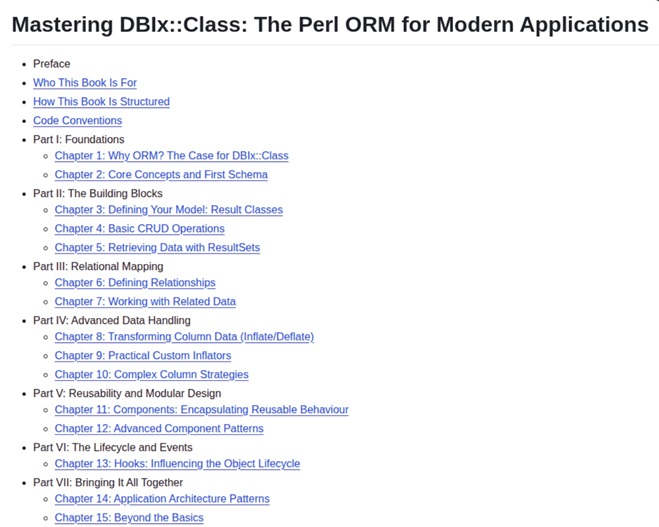
This work is part of my upcoming book, currently titled Mastering DBIx::Class: The Perl ORM for Modern Applications. The first draft is now completed, marking a major milestone in a journey that aims to provide a deep, practical guide to one of Perls most powerful and widely used ORM.
I am about to begin the second phase of the process - arguably the most critical stage - where ideas are refined, examples are sharpened, and the material truly comes to life. While my original plan was to complete this phase during my Christmas break, it didn’t quite work out that way. That’s perfectly fine, this is a book worth taking the time to get right.
This book is dedicated to the memory of Matt S. Trout, whose work and influence continue to shape the DBIx::Class ecosystem and the wider Perl community.
Here is the TOC:
What is DBIx::Class::Async?
If you’ve worked with DBIx::Class (DBIC) in Perl, you know it’s the gold standard for database abstraction.
But in today’s world of async programming and event-driven applications, blocking database calls can be a bottleneck.
That’s where DBIx::Class::Async comes in - a brand new CPAN distribution that brings asynchronous database operations to your DBIC applications.
DBIx::Class::Async provides asynchronous access to DBIx::Class using a process-based worker pool built on IO::Async::Function.
Each worker maintains a persistent database connection and executes blocking DBIC operations outside the main event loop, returning results via Future objects.
Key Features
- Process-based worker pool using IO::Async
- Persistent DBIx::Class connections per worker
- Non-blocking
CRUDoperations via Future - Optional result caching via CHI
- Transaction support
- Optional retry with exponential backoff
- Health checks and graceful shutdown
Installation
$ cpanm -vS DBIx::Class::Async
Or add to your cpanfile:
requires 'DBIx::Class::Async', '0.01';
Quick Start
Here’s a simple example to get you started:
use v5.38;
use IO::Async::Loop;
use DBIx::Class::Async;

my $loop = IO::Async::Loop->new;

my $db = DBIx::Class::Async->new(
    schema_class => 'MyApp::Schema',
    connect_info => [
        'dbi:SQLite:dbname=my.db',
        undef,
        undef,
        { sqlite_unicode => 1 },
    ],
    workers   => 2,
    cache_ttl => 60,
    loop      => $loop,
);
APPROACH 1: Future chaining with ->then / ->catch
Best for: Complex async workflows, transforming data, chaining operations
- Creates a new
Futurechain that transforms results ->then()receives the result and can return a new Future->catch()handles errors and can recover or transform them- Must manually stop the loop when done
- Returns a new
Future(must store it or use->retainto avoid void context warning)
Good for: piping data through transformations, conditional logic, error recovery
my $f = $db->search('User', { active => 1 })
           ->then(sub {
                my ($rows) = @_;
                for my $row (@$rows) {
                    say $row->{name};
                }
                $loop->stop;
                return Future->done;
            })
            ->catch(sub {
                my $error = shift;
                warn "Query failed: $error";
                $loop->stop;
                return Future->fail($error);
            });
$loop->run;
$db->disconnect;
APPROACH 2: Callback registration with ->on_done / ->on_fail
Best for: Side effects, logging, simple async operations
- Registers callbacks on the original
Future(doesn’t create a new one) ->on_done()is called whenFuturecompletes successfully->on_fail()is called whenFuturefails- Must manually stop the loop when done
- Returns the same
Future(safe to use in any context)
Good for: fire-and-forget operations, logging, simple handling
my $f = $db->search('User', { active => 1 })
           ->on_done(sub {
                my ($rows) = @_;
                for my $row (@$rows) {
                    say $row->{name};
                }
                $loop->stop;
           })
           ->on_fail(sub {
                my $error = shift;
                warn "Query failed: $error";
                $loop->stop;
           });

$loop->run;
$db->disconnect;
APPROACH 3: Blocking with ->get()
Best for: Scripts, simple sequential operations, testing
- Blocks until the
Futurecompletes (synchronous-style) - Automatically runs and stops the event loop internally
- Throws exception on failure (use
try/catchoreval) - No manual loop management needed
- Returns the actual result value directly
Good for: simple scripts, sequential operations, when you don’t need concurrency
use Try::Tiny;

try {
    my $rows = $db->search('User', { active => 1 })->get;
    for my $row (@$rows) {
        say $row->{name};
    }
}
catch {
    warn "Query failed: $_";
};

$db->disconnect;
SUMMARY
->then/->catch: For complex async workflows and data transformation->on_done/->on_fail: For simple callbacks and side effects->get(): For blocking/synchronous-style code
Core Methods
Search with conditions and attributes
my $users = $db->search('User',
    { active => 1 },
    { order_by => 'created_at DESC', rows => 10 }
)->get;
Find single record
my $user = $db->find('User', 123)->get;

my $new_user = $db->create('User', {
    name  => 'Alice',
    email => 'alice@example.com',
})->get;
Update existing record
my $updated = $db->update('User', 123, {
    status => 'verified',
})->get;
Delete record
my $deleted = $db->delete('User', 456)->get;
Count records
my $count = $db->count('User', { active => 1 })->get;
Advanced Features
Concurrent Queries
my ($users, $orders) = $db->search_multi(
    ['User', { active => 1 }, { rows => 10 }],
    ['Order', undef, { order_by => 'created_at DESC', rows => 5 }],
)->get;
Prefetching Relationships
my $users_with_orders = $db->search_with_prefetch(
    'User',
    { active => 1 },
    'orders',
    { rows => 10 }
)->get;
Transactions
IMPORTANT: The method txn_do() method has limitations due to serialisation constraints.
The CODE reference passed to txn_do() must be serialisable by Sereal which may not support anonymous subroutines or CODE references with closed over variables in all configurations.
my $result = $db->txn_do(sub {
    my $schema = shift;

    # These operations succeed or fail together
    $schema->resultset('Order')->find(1)->update({
        amount => \'amount - 10'
    });
    $schema->resultset('Order')->find(2)->update({
        amount => \'amount + 10'
    });

    return 'transfer_complete';
})->get;
If you encounter serialisation errors, then you can try this instead txn_batch().
my $result = $db->txn_batch(
    { type      => 'update',
      resultset => 'Order',
      id        => 1,
      data      => { amount => \'amount + 10' }
    },
    { type      => 'update',
      resultset => 'Order',
      id        => 2,
      data      => { amount => \'amount - 10' }
    },
)->get;
Raw SQL Queries
my $rows = $db->raw_query(
    'SELECT * FROM users WHERE active = ?', [1]
)->get;
Configuration Options
The constructor accepts various configuration parameters:
my $db = DBIx::Class::Async->new(
    schema_class   => 'MyApp::Schema',
    connect_info   => $connect_info,
    workers        => 4,                  # Default: 4
    loop           => $loop,              # Optional custom loop
    cache_ttl      => 300,                # Cache TTL in seconds
    cache          => $chi_object,        # Custom cache object
    enable_retry   => 1,                  # Enable retry on deadlocks
    max_retries    => 3,                  # Maximum retry attempts
    retry_delay    => 1,                  # Initial retry delay
    query_timeout  => 30,                 # Query timeout in seconds
    enable_metrics => 1,                  # Enable metrics collection
    health_check   => 300,                # Health check interval
    on_connect_do  => ['SET NAMES utf8'], # SQL to run on connect
);
Performance Tips
- Worker Count: Adjust based on your database connection limits (
2-4workers perCPUcore usually works well) - Caching: Use caching for read-heavy workloads with appropriate
TTL - Batch Operations: Use
search_multifor fetching unrelated data concurrently - Connection Pooling: Each worker maintains its own persistent connection
- Timeouts: Set appropriate
query_timeoutvalues to prevent hung queries
Error Handling
All methods throw exceptions on failure. Use try/catch blocks or ->catch on futures:
$db->search('User', { active => 1 })
   ->then(sub {
       my ($users) = @_;
       # Process users
   })
   ->catch(sub {
       my $error = shift;
       warn "Query failed: $error";
   });
Common retryable errors (when enable_retry is true):
- Deadlocks
- Lock wait timeouts
- Connection issues
- MySQL server has gone away
Metrics Collection
When enable_metrics is true and Metrics::Any is installed:
# Enable metrics
my $db = DBIx::Class::Async->new(
    # ... other config ...
    enable_metrics => 1,
);

# Get statistics
my $stats = $db->stats;
When to use DBIx::Class::Async?
- Web applications with high concurrency
- Event-driven systems using
IO::Asyncor similar frameworks - Microservices requiring non-blocking database access
- Background job processors
- Real-time applications with
WebSocketconnections
Limitations
- Returned rows are plain hashrefs, not DBIC row objects
- Transactions execute on a single worker only
- Large result sets are loaded entirely into memory (use pagination)
- Worker processes add some memory overhead
Contributions
- Repository: https://github.com/manwar/DBIx-Class-Async
- Issues: https://github.com/manwar/DBIx-Class-Async/issues
Conclusion
DBIx::Class::Async bridges the gap between the robust ORM capabilities of DBIx::Class and the modern async programming paradigm. Whether you’re building a high-traffic web application or a real-time data processing system, this module provides the asynchronous database access you need while maintaining the familiar DBIC interface.
Give it a try and let us know what you think!
Your feedback and contributions are always welcome.
Happy Hacking !!!