
DISCLAIMER: Image is generated using ChatGPT.
As a longtime Dancer2 fan, I’ve always admired its elegance for building web apps. But recently, I decided to step out of my comfort zone and try something new, Mojolicious. Known for its real‑time web capabilities, Mojo seemed like the perfect framework to experiment with WebSockets. And what better way to test it than building a live chat room?
Project Structure
    ├── chat-server.pl
    ├── public
    │   ├── css
    │   │   └── style.css
    │   └── js
    │       └── chat.js
    └── templates
        └── index.html.ep
Here’s the script I came up with, a fully functional, minimal WebSocket Chat Server in just 60 lines of Perl. Let me walk you through it, piece by piece.
The Setup
We start by importing Mojolicious::Lite, the lightweight version of Mojo that’s perfect for quick apps. Mojo::JSON handles JSON encoding/decoding, essential for WebSocket messaging.
#!/usr/bin/env perl

use Mojolicious::Lite;
use Mojo::JSON qw(decode_json encode_json);
Global State
Since WebSocket connections are persistent, we need to track connected clients and message history. $clients is a hashref keyed by connection ID, and @history keeps the last 10 messages for newcomers.
my $clients = {};
my @history;
The Homepage
A simple GET route serves the HTML frontend (from a template named index). Mojo’s $c is the controller object, similar to Dancer2’s request object.
get '/' => sub {
    my $c = shift;

    $c->render(template => 'index', title => 'Online Chat App');
};
The WebSocket Handler
When a client connects to /chat, we create a unique ID from the transaction object ($c->tx) and store the connection along with a default username.
websocket '/chat' => sub {
    my $c  = shift;
    my $id = sprintf "%p", $c->tx;
    $clients->{$id} = { tx => $c->tx, name => 'Anonymous' };
Handling Incoming Messages
Mojo uses event-driven callbacks.
Here, we listen for message events, decode the incoming JSON, and handle different message types:
-
Typing indicators: Broadcast when a user is typing (excluding the sender).
-
Join events: Assign a username, send the message history to the new user, and announce their arrival to others.
-
Chat messages: Add a timestamp, store in history (capped at 10), and broadcast to all.
    $c->on(message => sub {
        my ($self, $msg) = @_;

        my $data = eval { decode_json($msg) };
        if ($@ || !$data) {
            app->log->error("Bad JSON received: $@");
            return;
        }

        if ($data->{type} eq 'typing') {
            # Send the typing status to everyone EXCEPT the person typing
            broadcast({
                type     => 'typing',
                user     => $clients->{$id}{name},
                isTyping => $data->{isTyping}
            }, $id);
        }
        elsif ($data->{type} eq 'join') {
            $clients->{$id}{name} = $data->{name};

            # Send existing history ONLY to the user who just joined
            for my $old_msg (@history) {
                $c->send(encode_json($old_msg));
            }

            broadcast({ type => 'system', text => "$data->{name} joined" });
            send_user_list();
        }
        elsif ($data->{type} eq 'message') {
            my (undef, $min, $hour) = localtime();
            my $timestamp = sprintf("%02d:%02d", $hour, $min);
            my $msg_out   = {
                user      => $clients->{$id}{name},
                text      => $data->{text},
                timestamp => $timestamp
            };

            # Push to history and keep only the last 10
            push @history, $msg_out;
            shift @history if @history > 10;

            broadcast($msg_out);
        }
    });
Cleaning Up on Disconnect
When a WebSocket closes, we remove the client from $clients and notify everyone.
    $c->on(finish => sub {
        my $name = $clients->{$id}{name};
        delete $clients->{$id};
        broadcast({ type => 'system', text => "$name left" });
        send_user_list();
    });
Helper Subs
sub broadcast {
    my $msg = encode_json(shift);
    $_->{tx}->send($msg) for values %$clients;
}

sub send_user_list {
    my @names = sort map { $_->{name} } values %$clients;
    broadcast({ type => 'users', list => \@names });
}
Kicking Things Off
Finally, we start the Mojo app.
app->start;
With the built-in web server, launch the deamon like below:
$ perl chat-server deamon
[2026-02-07 21:43:08.63656] [368424] [info] Listening at "http://*:3000"
Web application available at http://127.0.0.1:3000
Final Look
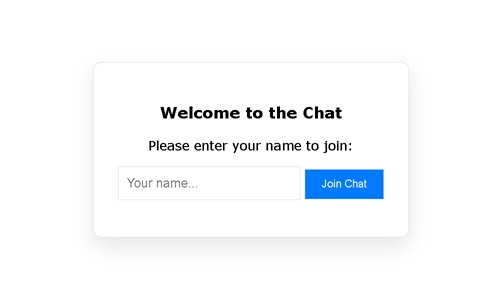
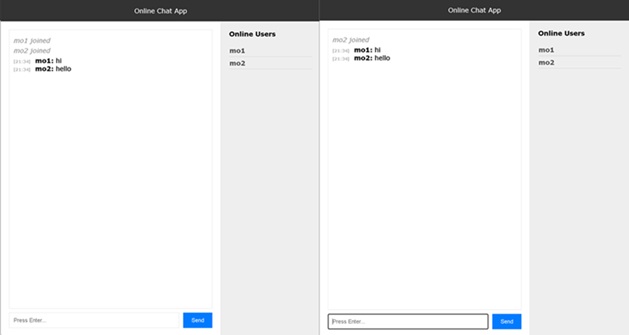
First Impressions
Coming from Dancer2, I appreciated Mojo’s all-in-one approach, no need for extra PSGI setup or external modules for WebSockets. The event-driven style felt natural for real-time apps, and the built-in JSON handling kept things tidy.
Is Mojo going to replace Dancer2 for me?
Not necessarily, but for real-time features, it’s a powerful tool to have in the toolbox. And building this chat server was a fun way to dive in.
You can find the full code (including the frontend template) on GitHub.
Happy Hacking !!!