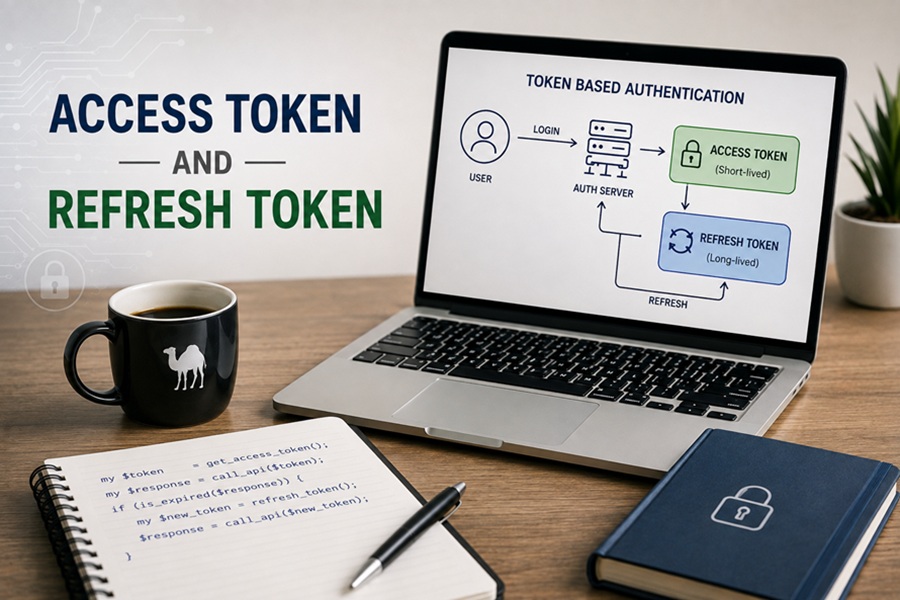
DISCLAIMER: Image is generated using ChatGPT.
Couple of months ago, I shared my experience with JSON Web Token (JWT) in the post titled: JWT with Dancer2.
Having done that, I keep getting mixed up with Access Token and Refresh Token.
In this post, I will try to get to the bottom of it.
Access Token
It’s like a wristband, short-lived, e.g. expires in 15 minutes. You present it at every gate, bar, or stage to get immediate entry. If someone steals it, the damage is temporary because it expires fast.
Refresh Token
It’s like a ticket receipt, long-lived, e.g. valid for 30 days. You keep it safely in your wallet. You don’t show it to the bartender, you only present it at the box office to get a new wristband when your old one expires.
Why Use Both?
If you only used an Access Token with a long lifespan, a stolen token would give an attacker full access for a long time.
If you only used a short-lived token without a Refresh Token, the user would have to type in their username and password every 15 minutes.
Combining both provides high security with a frictionless user experience.
Does this apply to JWT?
As a matter of fact, the access tokens are presently designed in the format of JWT cybertokens.
In order to understand how these tokens work together, it is important to mention the difference between Roles and Formats that is as follows:
Access TokenandRefresh Tokenrefer to theROLES, that is, the function performed by the token.
JWTrefers to theFORMAT, meaning the type of data packaged into the token.
Usually, the Access Token is a JWT since it contains signed data about a user that can be verified by any microservice.
As for the Refresh Token, it may be represented in the instance of a JWT, however, in the majority of cases, it is just a random secure string which is kept in a database.
Where is it used?
In the case of a Web or a Mobile application, the Access Tokens and Refresh Tokens are utilized in three particular instances, namely:
Where are they applied?
In case of a Web or Mobile application, Access Tokens and Refresh Tokens serve three specific purposes, which are:
1. Client-Side Storage
Access Token: Kept in the memory of the application or aJavaScriptvariable/state or a temporary cookie. The fact that it quickly expires makes storing it in memory help to minimise the potential period when the attacker could take advantage of theXSSVulnerability.
Refresh Token: Preserved in anHttpOnly,Secure,SameSiteCookie for web-based applications, or Encrypted OS Storage. AsJavaScriptcan’t readHttpOnlycookies, the refresh token cannot be stolen in anXSSattack.
2. Network Requests
Access Token: Passed to all API back-end endpoints. It is given in the request header of theHTTPrequest:
Refresh Token: Sent ONLY to the renewal endpoint of the server of the authorisation. It is not sent to API endpoints.
3. Server-Side Validation
Access Token: Verified byAPI GatewaysandMicroservices. WithJWTshaving cryptographic signatures, the microservices don’t need to check the database, so they don’t need to do anything other than verifying the signature locally.
Refresh Token: Verified by theAuthorisation Server.Auth Serverchecks its database or cache to confirm the validity of refresh token and that it is not revoked.
By default, common browser storage (like local storage or cookies) is accessible to JavaScript.
If a hacker manages to inject a malicious JavaScript into your site, he will easily get your Refresh Token and have unlimited access to the account for some time.
The combination of HttpOnly, Secure, and SameSite makes a cookie protected properly against the three main attacks on web applications.
Here is the example demo app that is created with real Perl web server using Mojolicious::Lite.
It has the frontend solution that performs login and returns the access token and HttpOnly refresh cookie as well as manages token rotation.
Source: app.pl
#!/usr/bin/env perl

use Mojolicious::Lite -signatures;

my %active_refresh_tokens;

# UI FRONTEND
get '/' => sub ($c) {
    $c->render(template => 'index');
};

# LOGIN ENDPOINT
post '/api/login' => sub ($c) {
    my $req = $c->req->json;

    if ($req->{username} eq 'alice' && $req->{password} eq 'secret123') {
        my $access_token  = "at_access_"  . int(rand(100000));
        my $refresh_token = "rt_refresh_" . int(rand(100000));

        # Save refresh token to server memory
        $active_refresh_tokens{$refresh_token} = "alice";

        # Set HttpOnly, Secure, SameSite Cookie
        $c->res->cookies({
            name     => 'refresh_token',
            value    => $refresh_token,
            path     => '/api/refresh',
            httponly => 1,
            samesite => 'Lax',
            max_age  => 3600 # 1 hour
        });

        return $c->render(json => { access_token => $access_token });
    }

    return $c->render(json => {
        error => 'Invalid credentials'
    }, status => 401);
};

# PROTECTED API ENDPOINT
get '/api/data' => sub ($c) {
    my $auth_header = $c->req->headers->authorization // '';

    if ($auth_header =~ /^Bearer (at_access_\d+)$/) {
        return $c->render(json => {
            message => "SUCCESS! Accessing top-secret user profile for Alice."
        });
    }

    return $c->render(json => {
        error => "401 Unauthorized: Access token missing or invalid!"
    }, status => 401);
};

# REFRESH ENDPOINT
post '/api/refresh' => sub ($c) {
    # Read cookie sent automatically by the browser
    my $cookie_token = $c->cookie('refresh_token');

    if ($cookie_token && exists $active_refresh_tokens{$cookie_token}) {
        my $new_access_token = "at_access_" . int(rand(100000));
        return $c->render(json => { access_token => $new_access_token });
    }

    return $c->render(json => {
        error => "403 Forbidden: Invalid or missing refresh cookie"
    }, status => 403);
};

app->start;

__DATA__

@@ index.html.ep
<!DOCTYPE html>
<html>
<head>
    <title>Perl Auth Demo</title>
    <style>
        body { font-family: sans-serif; max-width: 600px; margin: 40px auto; line-height: 1.6; }
        button { margin: 5px 0; padding: 10px 15px; cursor: pointer; }
        pre { background: #f4f4f4; padding: 10px; border-radius: 5px; }
        .box { border: 1px solid #ccc; padding: 15px; border-radius: 8px; margin-bottom: 15px; }
    </style>
</head>
<body>
    <h2>Perl Access & Refresh Token Demo</h2>

    <div class="box">
        <h3>1. Authentication</h3>
        <button onclick="login()">Log In (as alice)</button>
        <div><strong>Stored In-Memory Access Token:</strong> <span id="token-val">None</span></div>
    </div>

    <div class="box">
        <h3>2. Access Protected Resource</h3>
        <button onclick="fetchData()">Fetch /api/data</button>
        <button onclick="clearAccessToken()">Simulate Access Token Expiration</button>
    </div>

    <div class="box">
        <h3>3. Token Renewal</h3>
        <button onclick="refreshToken()">Renew Access Token via HttpOnly Cookie</button>
        <button onclick="inspectCookies()">Try to read document.cookie via JS</button>
    </div>

    <h3>Output Log:</h3>
    <pre id="log">Click a button to start...</pre>

    <script>
        let accessToken = null;

        function log(msg) {
            document.getElementById('log').innerText = msg;
        }

        async function login() {
            const res = await fetch('/api/login', {
                method: 'POST',
                headers: { 'Content-Type': 'application/json' },
                body: JSON.stringify({ username: 'alice', password: 'secret123' })
            });
            const data = await res.json();
            if (res.ok) {
                accessToken = data.access_token;
                document.getElementById('token-val').innerText = accessToken;
                log("Logged in successfully!\nAccess Token saved to JS variable.\nRefresh Cookie saved to browser (HttpOnly).");
            } else {
                log("Login failed: " + data.error);
            }
        }

        async function fetchData() {
            const res = await fetch('/api/data', {
                headers: { 'Authorization': `Bearer ${accessToken}` }
            });
            const data = await res.json();
            log(`HTTP Status: ${res.status}\nResponse: ${JSON.stringify(data, null, 2)}`);
        }

        function clearAccessToken() {
            accessToken = null;
            document.getElementById('token-val').innerText = 'None (Expired)';
            log("Access Token cleared from JS memory. Standard API calls will now fail with 401 Unauthorized.");
        }

        async function refreshToken() {
            const res = await fetch('/api/refresh', { method: 'POST' });
            const data = await res.json();
            if (res.ok) {
                accessToken = data.access_token;
                document.getElementById('token-val').innerText = accessToken;
                log("Token Renewed!\nThe browser automatically sent the HttpOnly cookie to /api/refresh.\nNew Access Token stored in JS variable.");
            } else {
                log("Refresh failed: " + data.error);
            }
        }

        function inspectCookies() {
            alert("document.cookie output: \"" + document.cookie + "\"\n\nNotice that 'refresh_token' is NOT listed! JavaScript cannot access it.");
        }
    </script>
</body>
</html>
Start the Application
$ perl app.pl daemon
[2026-08-03 13:43:34.85207] [400543] [info] Listening at "http://*:3000"
Web application available at http://127.0.0.1:3000
Landing page
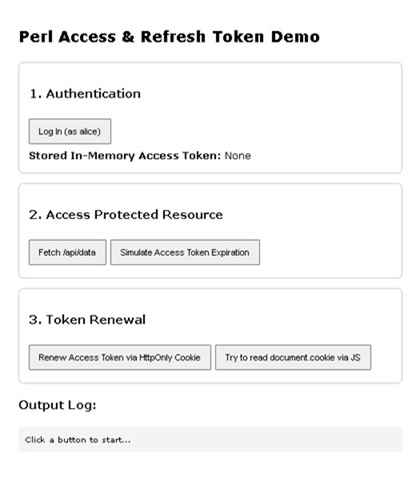
Click “Log in” button
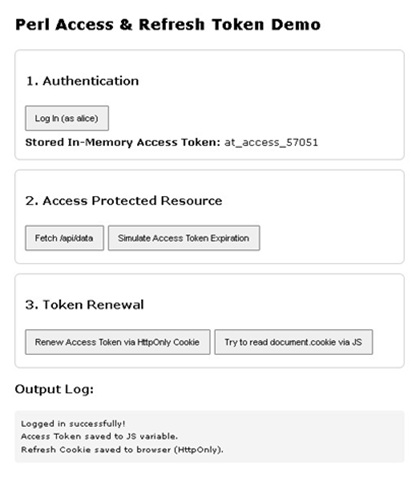
Click “Fetch /api/data” button
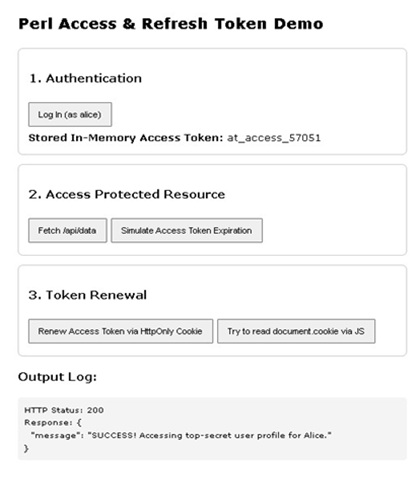
Click “Simulate Access Token Expiration” button
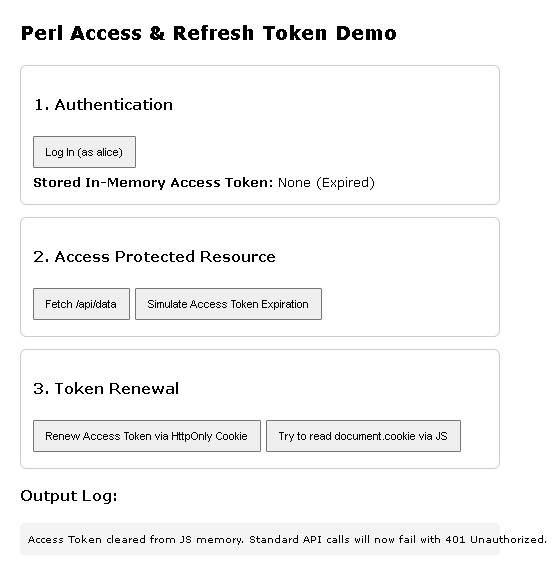
Click “Renew Access Token via HttpOnly Cookie” button
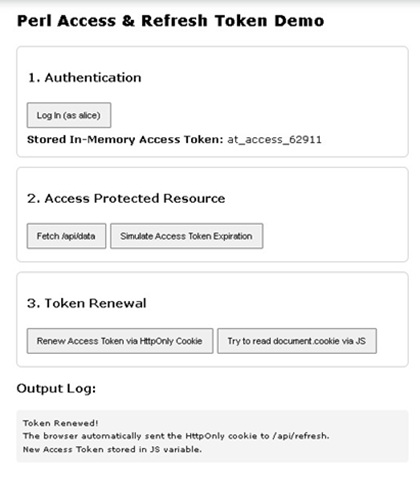
Click “Try to read document.cookie via JS” button
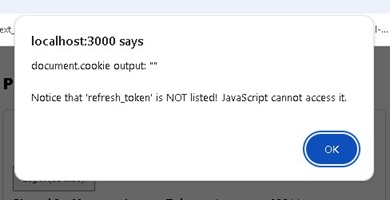
Happy Hacking !!!