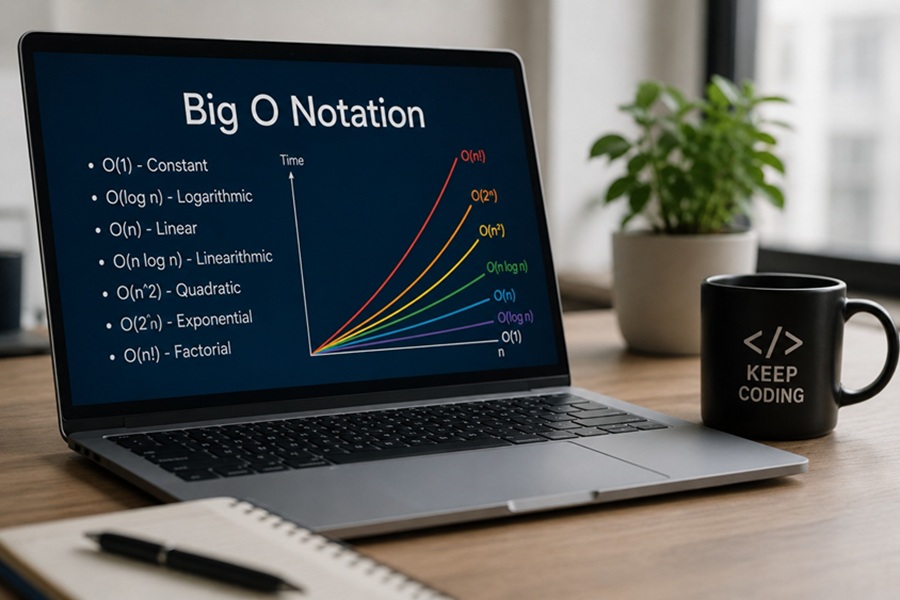
DISCLAIMER: Image is generated using ChatGPT.
Before I start, let me give you some background: I hold an Honours Degree in Mathematics. During my degree program in 1993, I completed a one-year Diploma in Information and System Management course. That was the only formal technical education I ever received, and even then I was only taught COBOL and FoxPro. Everything else I have learned has been through books or, later, by looking up materials online.
These days, AI is making things easier but with a catch. I still prefer reading authentic materials available freely online, and I have a long TODO list of topics I want to explore. Today, I finally picked one from that list that has been waiting for a long time.
As now you know, I don’t have a formal Computer Science background, so I often find many gaps in my knowledge. One of those was Time/Space Complexity. I tried to get to the bottom of it but failed in my last attempt. A friend of mine, Flavio Poletti, tried to explain the subject to me a few years ago but I still didn’t quite click.
In this post, I will try to "brain dump" what I know so far. Please correct me if I am missing something or talking rubbish!
In computer science, we use Big O Notation to measure the "cost" of an algorithm in two different forms: Time and Space.
1. Time Complexity (Speed)
This measures how many steps an algorithm takes as the input size (n) grows. The goal is to finish the task as fast as possible.
2. Space Complexity (Memory)
This measures how much extra memory your script needs to finish the task as the input size (n) grows. The goal is to use as little RAM as possible.
Today, I will focus mostly on Time Complexity from the Perl point of view.
1. O(1) - Constant Time
2. O(n) - Linear Time
3. O(log n) - Logarithmic Time
4. O(n ^ 2) - Quadratic Time
5. O(n log n) - Linearithmic Time
6. O(sqrt n) - Square Root Time
7. O(n ^ 3) - Cube Time
8. O(2 ^ n) - Exponential Time
9. O(n!) - Factorial Time
1. O(1) - Constant Time
In Perl, searching a hash is O(1) because it uses a lookup table. It doesn’t matter if the hash has 10 keys or 10 million, the time to find a value is virtually identical.
my %library = ( '1-23-45' => 'Learning Perl', '6-78-90' => 'Mastering Perl' );

# Finding a book by its key is instant
my $book = $library{'6-78-90'};
2. O(n) - Linear Time
If you have an array, you usually have to look at every element. This is the most common time complexity in basic scripts.
my @books = ('Learning Perl', 'Mastering Perl', 'Perl Best Practices');
my $_book = 'Perl Best Practices';

foreach my $book (@books) {
    if ($book eq $_book) {
        print "Found it!\n";
        last;
    }
}
If @books grows to a million items, this loop might have to run a million times.
3. O(log n) - Logarithmic Time
If your array is sorted, you can be much smarter. You jump to the middle, see if your target is higher or lower, and cut the search area in half every time.
use List::BinarySearch qw(binsearch);

my @sorted_numbers = (10, 20, 30, 40, 50, 60, 70, 80, 90, 100);
my $target = 70;

# Instead of checking 1, 2, 3... it finds 70 in just a few jumps
my $index = binsearch { $a <=> $b } $target, @sorted_numbers;
4. O(n ^ 2) - Quadratic Time
This usually happens when you are comparing every item in a list against every other item (like finding duplicates without using a hash).
my @list = (1, 2, 3, 4, 5);

for my $i (0 .. $#list) {
    for my $j (0 .. $#list) {
        if ($i != $j && $list[$i] == $list[$j]) {
            print "Found a duplicate: $list[$i]\n";
        }
    }
}
WARNING: If @list has 1_000 items, Perl performs 1_000_000 comparisons. If it has 10_000 items, it performs 100_000_000!
5. O(n log n) - Linearthmic Time
This is the "Gold Standard" for sorting. Most modern sorting algorithms, like Perl’s built-in sort, run in O(n log n).
Efficient sorting algorithms work by repeatedly splitting the data in half.
Why O(n log n)?
The number of times you can split n items in half until you reach one item is log2n. At each of those splits, the algorithm has to look at or compare all n items to merge them back together in order.
# An unsorted array of 'n' elements
my @data = (54, 26, 93, 17, 77, 31, 44, 55, 20);

# Perl's built-in sort is O(n log n)
my @sorted = sort { $a <=> $b } @data;

print "Sorted List: @sorted\n";
It is slightly slower than O(n) but much, much faster than O(n^2).
6. O(sqrt n) - Square Root Time
This is rarer but very important in number theory and cryptography.
Testing if a number is prime. To see if 101 is prime, you don’t need to check all numbers up to 101, you only need to check numbers up to sqrt {101}, which is roughly 10.
sub is_prime {
    my $n = shift;
    for (my $i = 2; $i <= sqrt($n); $i++) {
        return 0 if $n % $i == 0;
    }
    return 1;
}
7. O(n ^ 3) - Cube Time
Common in 3D graphics or complex matrix math.
It occurs when the number of operations grows with the cube of the input size. In code, this most commonly appears as three nested loops iterating over the same collection (or collections of similar size).
While O(n^2) is often considered "slow" for large datasets, O(n^3) is significantly worse.
It is usually only acceptable for very small inputs.
Finding Triplets: A simple example is searching for three numbers in a list that add up to a specific sum using a brute-force approach.
my @numbers = (1, 2, 3, 4, 5, 6, 7, 8);
my $target  = 15;
my $n       = scalar @numbers;

# Three nested loops = O(n * n * n) = O(n^3)
for (my $i = 0; $i < $n; $i++) {
    for (my $j = $i + 1; $j < $n; $j++) {
        for (my $k = $j + 1; $k < $n; $k++) {
            if ($numbers[$i] + $numbers[$j] + $numbers[$k] == $target) {
                print "Found triplet: $numbers[$i], $numbers[$j], $numbers[$k]\n";
            }
        }
    }
}
To see how quickly this gets out of hand, look at how the operations explode compared to the previous complexities we discussed:
a) n = 10    : 10^3     = 1_000 operations. (Instant)
b) n = 100   : 100^3    = 1_000_000 operations. (Noticeable)
c) n = 1_000 : 1_000^3  = 1_000_000_000 operations. (1 Billion!)
d) n = 10_000: 10_000^3 = 1_000_000_000_000 operations. (1 Trillion!)
You don’t see O(n^3) as often as the others because developers try very hard to avoid it.
8. O(2 ^ n) - Exponential Time
This is where things get truly "dangerous" for a programmer. In this complexity, the number of operations doubles every time you add just one single element to your input.
This usually happens in algorithms that try to explore every possible combination or subset of a problem.
The most famous example of O(2^n) is the "naive" recursive calculation of the Fibonacci sequence. To calculate a number, the function calls itself twice, creating a massive tree of redundant calculations.
sub fibonacci {
    my ($n) = @_;

    # Base cases
    return $n if $n <= 1;

    # Exponential growth: Each call branches into TWO more calls: O(2^n)
    return fibonacci($n - 1) + fibonacci($n - 2);
}

my $num = 10;
print "Fibonacci of $num is: " . fibonacci($num) . "\n";
Why is this so slow?
To calculate fibonacci(5), the code calculates fibonacci(3) multiple times, fibonacci(2) even more times, and so on. It doesn’t "remember" that it already did the work.
In Perl, we solve O(2^n) recursive problems using Memoization. By storing the result of a calculation in a hash, we can turn an exponential O(2^n) nightmare into a linear O(n) dream.
my %memo;
sub fast_fib {
    my ($n) = @_;

    return $n if $n <= 1;
    return $memo{$n} if exists $memo{$n};

    $memo{$n} = fast_fib($n - 1) + fast_fib($n - 2);
    return $memo{$n};
}
9. O(n!) - Factorial Time
The slowest of the common complexities.
While exponential growth O(2^n) is scary, factorial growth O(n!) is catastrophic.
In factorial time, every time you add a single new element, you multiply the entire previous workload by the new total number of elements.
The classic example is generating every possible ordering of a list. If you have 3 letters (A, B, C), there are 3 x 2 x 1 = 6 permutations. If you have 10 letters, there are over 3.6 million.
my @list = ('A', 'B', 'C', 'D');

sub backtrack {
    my ($items, $current) = @_;

    if (!@$items) {
        print "@$current\n";
        return;
    }

    for my $i (0 .. $#$items) {
        my @remaining = @$items;
        my $picked    = splice(@remaining, $i, 1);

        # Recursive call that branches n! times
        backtrack(\@remaining, [@$current, $picked]);
    }
}

backtrack(\@list, []);
If n=20, an O(2^n) algorithm might take a second or two on a modern computer. An O(n!) algorithm would take roughly 77 years on that same computer.
Time vs Space
1. The Hash Approach: O(n) Time, O(n) Space
This is the most balanced approach, but it is "expensive" in terms of memory.
Time : You walk the list once O(n).
Space: You create a new hash (%seen) that grows as the list grows.
       If you have 1 million numbers, you now have 1 million hash
       keys sitting in your RAM.
Final verdict, you "traded" space to get better time.
2. The Nested Loop: O(n^2) Time, O(1) Space
This is the "space-saver" but "time-waster".
Time : You compare every pair O(n^2).
Space: You aren't storing anything new. You just have your original list
       and two small counter variables (i and j). Whether the list is 10
       items or 10 million, the extra memory used is constant O(1).
Final verdict, you "traded" time to save space.
3. The Factorial Approach: O(n!) Time, O(n) Space
This is a disaster on both fronts.
Time : You are generating every possible arrangement O(n!).
Space: Most permutation libraries in Perl generate the next permutation
       "on the fly" (using an iterator), so the space is actually only
       O(n) because it only holds one version of the list at a time.
NOTE: If you try to store all permutations in an array before checking them, your Space Complexity would also become O(n!), and your computer would likely crash almost instantly.
+--------------+-----------------+------------------+---------------------+
| Algorithm    | Time Complexity | Space Complexity | Resource "Cost"     |
+--------------+-----------------+------------------+---------------------+
| Hash Lookup  | O(n)            | O(n)             | High RAM, Low CPU   |
| Nested Loops | O(n^2)          | O(1)             | Low RAM, High CPU   |
| Sorting      | O(n log n)      | O(1)             | Low RAM, Medium CPU |
+--------------+-----------------+------------------+---------------------+
How to distinguish them in your head?
Ask: "How much longer will this take if I double the data?" -> That is Time Complexity.
Ask: "How much more RAM will I use if I double the data?" -> That is Space Complexity.
SUMMARY
When comparing all the complexities we’ve discussed, you can see why developers work so hard to stay on the left side of this chart.
-
Green Zone O(1), O(log n), O(n), O(sqrt n): Excellent. Scalable for almost any data size.
-
Yellow Zone O(n log n): Good. The standard for sorting.
-
Orange Zone (O(n^2), O(n^3): Risky. Fine for small lists, but will lag or crash with large data.
-
Red Zone O(2^n), O(n!): Horrible. Only usable for tiny inputs (usually n < 20).
Happy Hacking !!!