
DISCLAIMER: Image is generated using ChatGPT.
Two days ago, I wrote a blog post titled, Mojo meets GraphQL. It was my first time using GraphQL and it was mostly well received.
However, there is one particular question that has been bothering me for the last 2 days.
How does one integrate with sql data store orms like dbic class still usable ?
Since, I am deeply involved in writing the manuscript for my upcoming book on DBIx::Class, I feel pressured to answer this question quickly.
Because GraphQL, is still a new toy for me, I don’t have enough experience yet to navigate things easily.
But it’s the weekend so why not use the break to give it a try?
In the previous post, I used mock data as below:
my $authors = {
    1 => { name => "J.R.R. Tolkien" },
    2 => { name => "Isaac Asimov"   },
    3 => { name => "Damian Conway"  },
};

my $books = {
    1 => { title => "The Hobbit",          author_id => 1 },
    2 => { title => "Foundation",          author_id => 2 },
    3 => { title => "Perl Best Practices", author_id => 3 },
};
To prepare the ground for DBIx::Class, I need to create a schema class and two result classes as below:
lib/
└── Library
    ├── Schema
    │   └── Result
    │       ├── Author.pm
    │       └── Book.pm
    └── Schema.pm
Schema Class: lib/Library/Schema.pm
package Library::Schema;

use strict;
use warnings;
use base 'DBIx::Class::Schema';

__PACKAGE__->load_namespaces;

1;
Result Class: lib/Library/Schema/Result/Author.pm
package Library::Schema::Result::Author;

use base qw(DBIx::Class::Core);

__PACKAGE__->table('authors');

__PACKAGE__->add_columns(
    id   => { data_type => 'integer', is_auto_increment => 1 },
    name => { data_type => 'varchar', size => 255 },
);

__PACKAGE__->set_primary_key('id');

__PACKAGE__->has_many(books => 'Library::Schema::Result::Book', 'author_id');

1;
Result Class: lib/Library/Schema/Result/Book.pm
package Library::Schema::Result::Book;

use base qw(DBIx::Class::Core);

__PACKAGE__->table('books');

__PACKAGE__->add_columns(
    id        => { data_type => 'integer', is_auto_increment => 1 },
    title     => { data_type => 'varchar', size => 255 },
    author_id => { data_type => 'integer' },
);

__PACKAGE__->set_primary_key('id');

__PACKAGE__->belongs_to(author => 'Library::Schema::Result::Author', 'author_id');

1;
Now that we have DBIC skeleton ready, we are ready to re-write the example in the previous post.
Setup
File: mojo-app-v2.pl
#!/usr/bin/env perl

use Mojolicious::Lite -signatures;

use GraphQL::Schema;
use GraphQL::Type::List;
use GraphQL::Type::Object;
use GraphQL::Execution qw(execute);
use GraphQL::Type::Scalar qw($String $Int);

use lib 'lib/';
use Library::Schema;

my $db = Library::Schema->connect('dbi:SQLite:dbname=:memory:', '', '');
$db->deploy;

$db->resultset('Author')->create({
    name  => "J.R.R. Tolkien",
    books => [{ title => "The Hobbit" }]
});

$db->resultset('Author')->create({
    name  => "Isaac Asimov",
    books => [{ title => "Foundation" }]
});

$db->resultset('Author')->create({
    name  => "Damian Conway",
    books => [{ title => "Perl Best Practices" }]
});
Define GraphQL Types
my ($BookType, $AuthorType);

$AuthorType = GraphQL::Type::Object->new(
    name        => 'Author',
    description => 'An author in our library',
    fields      => sub {
        {
            id    => { type => $Int    },
            name  => { type => $String },
            books => {
                type    => GraphQL::Type::List->new(of => $BookType),
                resolve => sub ($author, $args, $context, $info) {
                    my $author_row = $db->resultset('Author')->find($author->{id});
                    return [] unless $author_row;
                    return [ map { { $_->get_columns } } $author_row->books->all ];
                },
            },
        },
    },
);

$BookType = GraphQL::Type::Object->new(
    name        => 'Book',
    description => 'A book in our library',
    fields      => sub {
        {
            id     => { type => $Int    },
            title  => { type => $String },
            author => {
                type    => $AuthorType,
                resolve => sub ($book, $args, $context, $info) {
                    my $book_row = $db->resultset('Book')->find($book->{id});
                    return unless $book_row && $book_row->author;
                    return { $book_row->author->get_columns };
                },
            },
        },
    },
);
Define Root Query
my $QueryType = GraphQL::Type::Object->new(
    name   => 'Query',
    fields => {
        book => {
            type    => $BookType,
            args    => { id => { type => $Int } },
            resolve => sub ($root, $args, $context, $info) {
                my $book_row = $db->resultset('Book')->find($args->{id});
                return $book_row ? { $book_row->get_columns } : undef;
            },
        },
        allBooks => {
            type    => GraphQL::Type::List->new(of => $BookType),
            resolve => sub {
                my @books = $db->resultset('Book')->all;
                return [ map { { $_->get_columns } } @books ];
            },
        },
        author => {
            type    => $AuthorType,
            args    => { id => { type => $Int } },
            resolve => sub ($root, $args, $context, $info) {
                my $author_row = $db->resultset('Author')->find($args->{id});
                return $author_row ? { $author_row->get_columns } : undef;
            },
        },
        allAuthors => {
            type    => GraphQL::Type::List->new(of => $AuthorType),
            resolve => sub {
                my @authors = $db->resultset('Author')->all;
                return [ map { { $_->get_columns } } @authors ];
            },
        },
    },
);
Build Schema
my $schema = GraphQL::Schema->new( query => $QueryType );
Define Web Route
post '/graphql' => sub ($c) {
    my $json_payload = $c->req->json;
    my $query        = $json_payload->{query};
    my $variables    = $json_payload->{variables} // {};

    my $result = execute($schema, $query, undef, undef, $variables);
    my $json   = JSON::PP->new->pretty->encode($result);

    $c->res->headers->content_type('application/json');
    $c->render(text => $json);
};

get '/graphql' => sub ($c) {
    $c->render(inline => <<'EOF');
<!DOCTYPE html>
<html lang="en">
<head>
  <meta charset="utf-8" />
  <title>GraphiQL Playground</title>
  <style>
    body { height: 100vh; margin: 0; overflow: hidden; }
    #graphiql { height: 100%; }
  </style>
  <link rel="stylesheet" href="https://cdnjs.cloudflare.com/ajax/libs/graphiql/3.0.7/graphiql.min.css" />
  <script src="https://cdnjs.cloudflare.com/ajax/libs/react/18.2.0/umd/react.production.min.js"></script>
  <script src="https://cdnjs.cloudflare.com/ajax/libs/react-dom/18.2.0/umd/react-dom.production.min.js"></script>
  <script src="https://cdnjs.cloudflare.com/ajax/libs/graphiql/3.0.7/graphiql.min.js"></script>
</head>
<body>
  <div id="graphiql">Loading...</div>
  <script>
    window.addEventListener('load', function() {
      const fetcher = GraphiQL.createFetcher({ url: '/graphql' });
      const root = ReactDOM.createRoot(document.getElementById('graphiql'));
      root.render(
        React.createElement(GraphiQL, {
          fetcher: fetcher,
          defaultEditorToolsVisibility: true
        })
      );
    });
  </script>
</body>
</html>
EOF
};
Start App
app->start;
The application is ready to test. Let’s start the application as below:
$ perl mojo-app-v2.pl daemon
[2026-06-06 23:11:04.66961] [617116] [info] Listening at "http://*:3000"
Web application available at http://127.0.0.1:3000
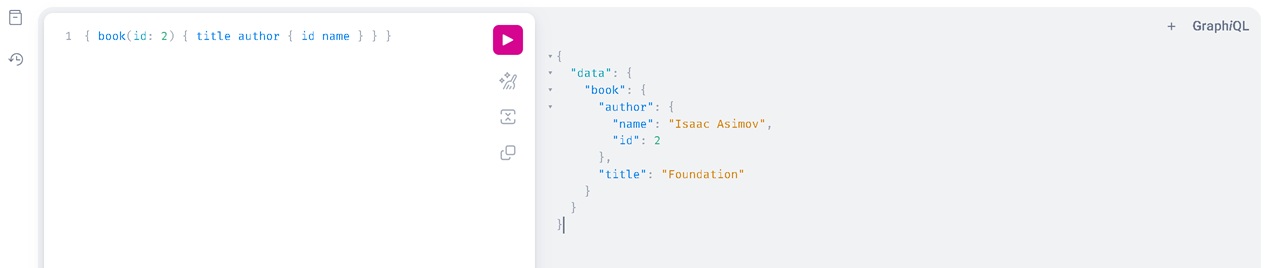
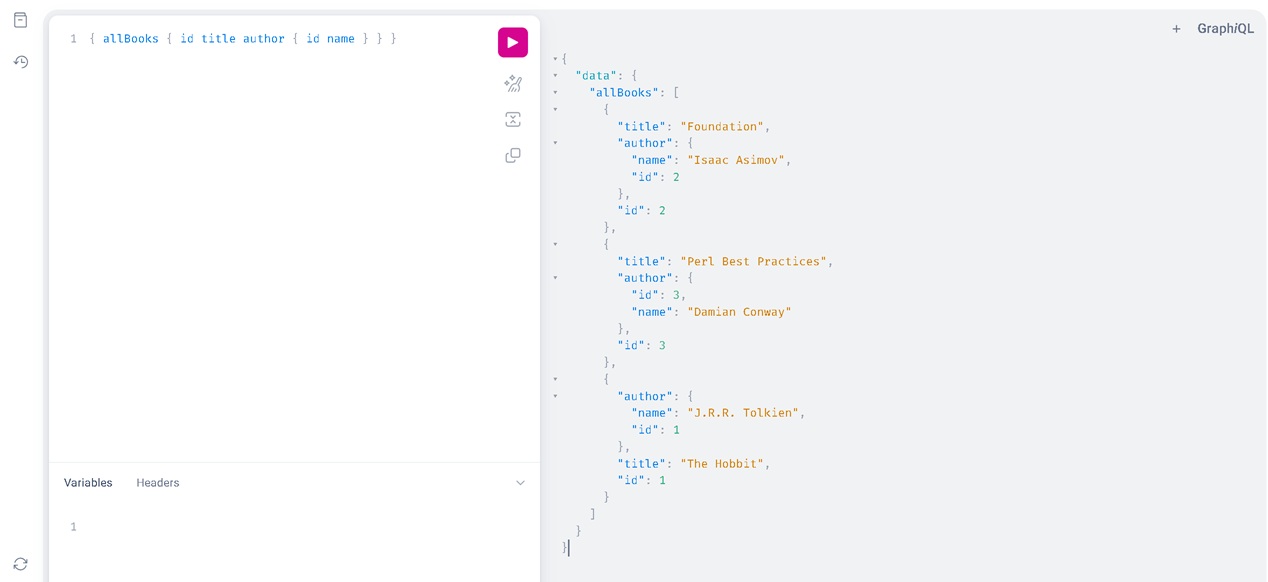
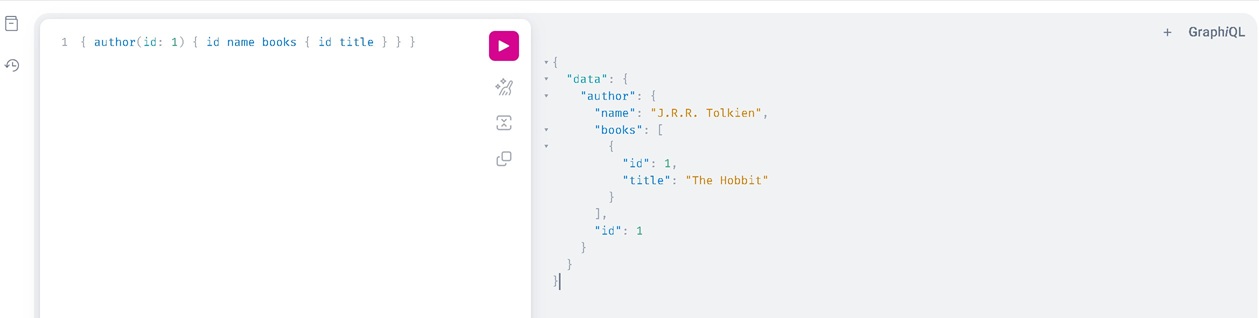
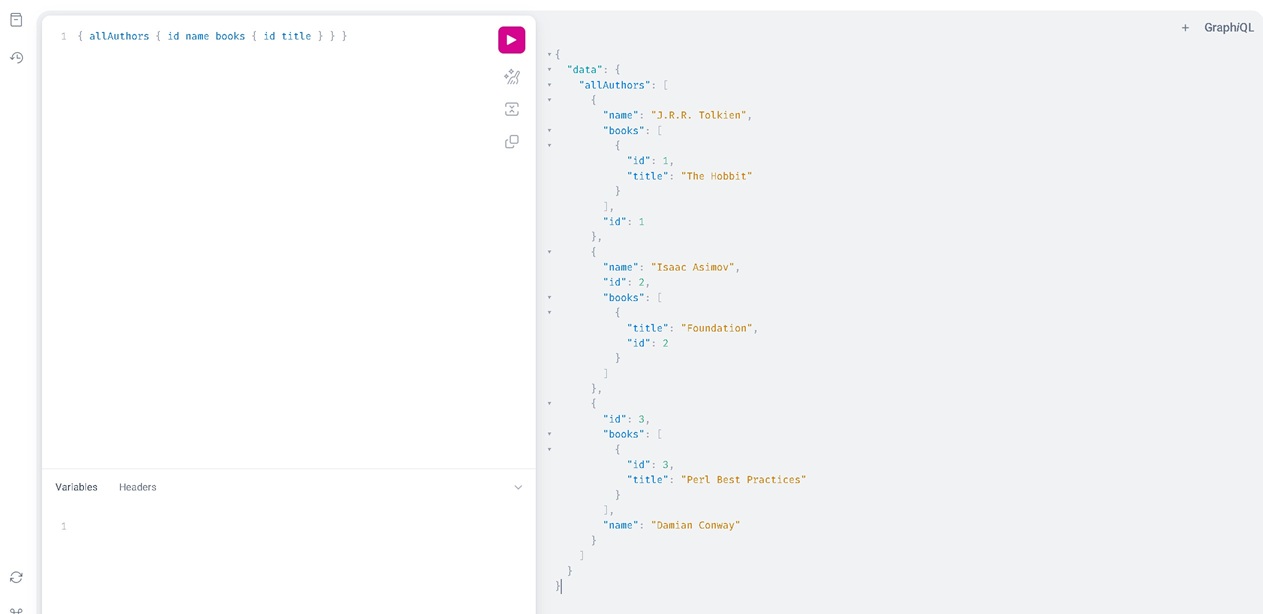
For testing we will use GraphiQL, in-browser IDE by visiting http://127.0.0.1:3000/graphql.
Happy Hacking !!!